
Illuminance
Light arriving per unit area. A desk, a wall, and the sensor can all have different illuminances.
How much light falls here? ↗PHOTOMETRY · GUIDE + WORKBENCH
Estimate luminance from metered camera exposure, relate illumination to surface reflectance, and examine focus-based distance measurements.
Camera principles across brands and designs · Model-specific controls vary
Use a camera as an approximate photometer, translate a known diffuse target’s luminance into illuminance, keep exposure settings separate from physical light exposure, and assess focus-based distance estimates.
Learn → measure → validate01 / THE QUANTITIES
Start by naming the quantity—and the plane where it is defined. “Brightness” alone is not enough.
Light arriving per unit area. A desk, a wall, and the sensor can all have different illuminances.
How much light falls here? ↗Directional light leaving a surface. A camera sees reflected light from paper or emitted light from a screen.
How much light comes from here? ↗A logarithmic index of aperture and shutter time. ISO is not part of the settings-EV definition.
Which exposure settings? ↗Illuminance integrated over time at a specified plane. At the sensor, this depends on the lens and scene.
How much light accumulates? ↗Definitions: CIE illuminance, luminance, and luminous exposure. A photometer is an instrument category covering several photometric quantities.
02 / THE OPTICS
The room, the subject, and the image plane are connected—but they are not interchangeable.
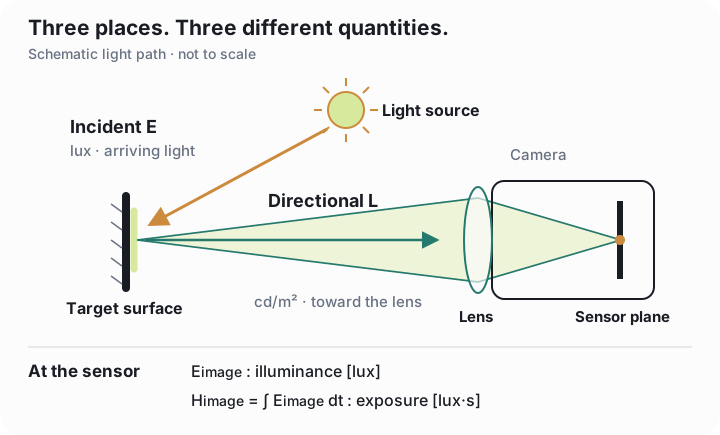
A reflected-light exposure meter views the subject through an angular field. Its output is usually an exposure recommendation, not a calibrated cd/m² reading. An incident meter samples illumination at the subject; a hemispherical photographic dome is not automatically a flat, cosine-corrected lux receptor.
Use seconds for t and numerical ISO for S. K = 12.5 and C = 250 are illustrative conventions for the stated units, not measured constants for your camera. Never insert lux into the K equation.
For an opaque, nonfluorescent Lambertian reflector, the reflected exitance is Mv = ρEv and Mv = πLv. Combining them gives:
The same illumination produces different luminances on dark and light surfaces. White paper has unknown reflectance, possible gloss, transmission, and optical brighteners. Even a nominal 18% card benefits from a characterized reflectance.
The inferred lux applies to the card’s position and orientation. There is no single orientation-independent “room lux.”
TRY IT / APERTURE
100% relative throughput
Fixed scene, time, focal length, and transmission.
Exact mathematical stop sequence. Camera labels such as f/5.6 and f/8 are rounded. N = focal length / entrance-pupil diameter.
TRY IT / SURFACE ORIENTATION
500 lx on the tilted surface
Ideal single collimated beam: E(θ) = E(0) cos θ, with E(0) = 500 lx. A room with several lights requires their directional contributions, not this single-beam shortcut.
A resolved uniform surface retains its luminance along a lossless path. Its angular size shrinks with distance. The camera’s central image-plane illuminance is approximately unchanged at fixed f-number while the target still fills the measurement region, under the distant-subject model. Inverse-square behavior applies to illuminance from a point-source approximation; do not apply it blindly to luminance.
At close focus, finite magnification and pupil geometry affect effective aperture. Vignetting, flare, absorption, and an underfilled metering spot also break the simplified model.
03 / AT THE CAMERA
Arbitrary settings describe an exposure. A meter recommendation adds information about the light.
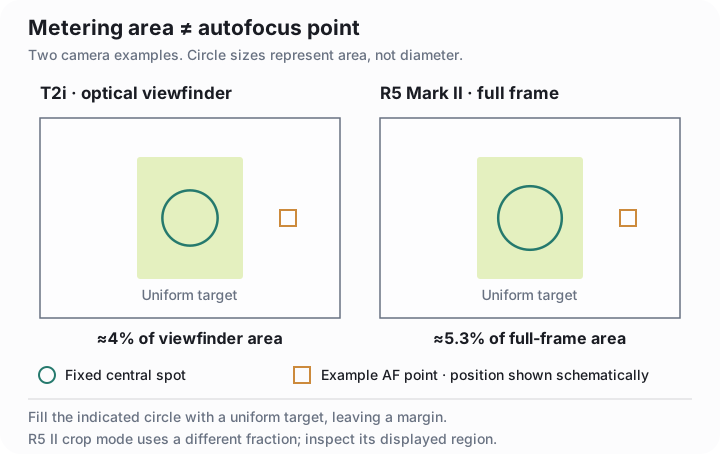
These principles apply to interchangeable-lens cameras, compacts, and other digital cameras. The meter method requires a controlled recommendation with known aperture, exposure time, and ISO. If spot metering is unavailable, a uniform target filling the entire metered field can reduce spatial ambiguity; validate that mode against a reference. Evaluative or subject-aware algorithms may alter their response with composition.
A dedicated DSLR exposure sensor and an imaging-sensor meter both observe light through the lens. Neither is automatically a calibrated luminance instrument. Choose the mode with documented, controllable behavior. A/Av is convenient for holding aperture fixed; it does not inherently give finer resolution than aperture or ISO controls. A fixed-aperture camera can use its known aperture if the remaining conditions are met.
Phone and computational-camera modes may combine exposures or omit the settings and meter information needed here. A finished image, its displayed brightness, or incomplete metadata is insufficient. Use a separately characterized imaging workflow when the meter method is unavailable. Consult your body, lens, adapter, and firmware documentation before adopting either named example.
04 / THE WORKBENCH
Each calculator is independent. Inputs update instantly; transfer buttons explicitly carry values between tools.
EXPOSURE READING → cd/m²
METER-BASED ESTIMATE
A DIFFUSE REFERENCE SURFACE
INFERRED ILLUMINANCE ON THE TARGET PLANE
A glossy patch, a display’s emitted light, or paper with unknown reflectance cannot establish incident lux by this simple reflection model.
KNOWN LIGHT → EXPOSURE SETTINGS
CALCULATED EXPOSURE TIME
Continuous mathematical solution. Check your lens and shutter limits, then choose an available setting; camera markings are rounded.
APERTURE + TIME → EV
SETTINGS EXPOSURE VALUE
| Aperture | Time | Settings EV |
|---|
Same N²/t and ISO; mathematical values, not a list of supported camera settings.
Choose the type of meter that supplied the reading. Reflected and incident conventions are alternative models; this is not a universal conversion between cd/m² and lux.
For a scene-referred reading with offsets removed: Lᵥ = (K/100)·2EV100 or Eᵥ = (C/100)·2EV100. Defaults are illustrative constants, not a calibration.
REFERENCE MEASUREMENT → EFFECTIVE K
SINGLE-POINT REFERENCE-DERIVED COEFFICIENT
IDEAL LENS MODEL → SENSOR PLANE
MODELLED LUMINOUS EXPOSURE AT THE SENSOR
ISO does not appear: it does not change the light incident on the sensor at fixed scene, aperture, and time. Room lux × shutter time is not sensor exposure.
05 / FOCUS & DISTANCE
A focus setting can support a range estimate. A sharp image alone does not tell you how many metres away the subject is.
Ordinary passive phase-detection autofocus detects defocus and directs a correction. Contrast autofocus searches image sharpness. Neither principle alone supplies an absolute distance reading: that also requires a mapping from the lens’s focus state to distance.
Some cameras expose a distance scale, numeric display, or file metadata. Others show only focus confirmation. Availability depends on the body, lens, adapter, firmware, and operating mode. A fixed-focus camera has no changing focus state from which to infer range. Active time-of-flight and stereo depth systems are different measurement methods with their own calibration.
Start with your manual. A lens scale or electronic display may provide a useful estimate, but a near/far focus guide can indicate adjustment direction without reporting metres. Record the stated units and reference plane; do not measure from the front of the lens by assumption.
Check whether original image files preserve distance information. Missing, stale, rounded, or infinity readings are legitimate possibilities. A sharp image, a focus-confirmation icon, and a precise-looking metadata value are different observations; none establishes calibrated ranging accuracy.
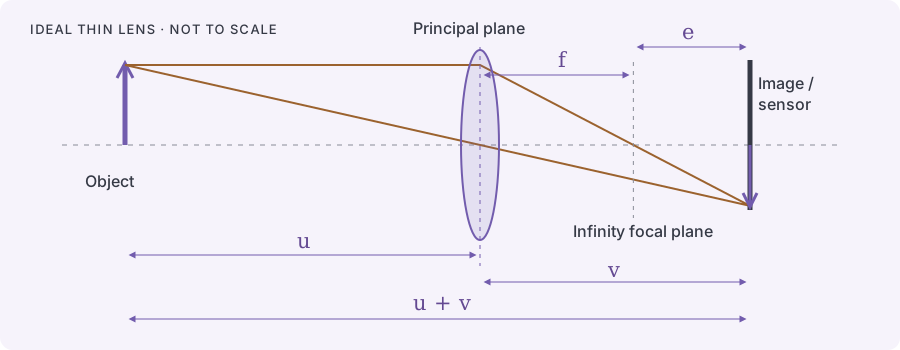
TRY IT / IDEAL FOCUS GEOMETRY
Scroll the plot sideways to see its full width.
µm ideal image-plane extension
Object distance is measured from the object-side principal plane. The output is a model result, not a camera reading, lens-motor travel, or specified range accuracy.
At infinity focus, the ideal image plane is one focal length behind the lens. A nearer subject requires a larger image distance. The extension e shrinks toward zero as the subject moves away, so many distant positions correspond to very similar focus states.
For an ideal 24 mm lens, e is about 590 µm at u = 1 m, 57.7 µm at 10 m, and 5.76 µm at 100 m. These distances start at the principal plane. Even a small focus-state error can therefore produce a large distance error far away.
Real internal-focusing lenses can change effective focal length and principal-plane positions. You cannot insert focus-ring rotation or an arbitrary encoder value into this equation. Depth of field describes acceptable image blur under a chosen criterion; it is not a confidence interval for subject distance.
A read-only ExifTool command can reveal available fields. Replace the filename with an original supported JPEG or RAW file. The webpage itself does not read files or connect to a camera.
exiftool -G1 -a -s -Make -Model -LensModel \
  -FocalLength \
  -SubjectDistance -SubjectDistanceRange \
  -FocusDistance -FocusDistanceLower \
  -FocusDistanceUpper -- "original-photo.jpg"
-G1 identifies groups and -a retains duplicate tags. A Composite value can be derived from other fields; it is not another independent observation. Save the formatted output, original file, and ExifTool version (exiftool -ver).
The standard EXIF SubjectDistance field uses metres with special unknown/infinity values. SubjectDistanceRange is a category such as close or distant view, not numerical bounds. Manufacturer fields require their own interpretation. No field’s name or decimal count establishes its accuracy or datum.
Definitions: CIPA Exif 2.3, SubjectDistance and SubjectDistanceRange. Original files from your equipment are needed to establish which fields actually exist.
Canon T2i / 550D with EF-S 24 mm f/2.8 STM. The standard controls offer focus confirmation and magnified Live View, but no numeric distance readout is documented, and this lens has no barrel distance scale. Canon’s lens specification lists distance information; that does not guarantee readable metadata or calibrated accuracy. Inspect and validate your own original files before relying on them. Lens specifications ↗
Canon R5 Mark II with RF/RF-S lenses. The documented display path is Shooting info. disp. → Lens info display → Focus distance disp, with selectable timing and units. Do not assume it is available with an adapted EF/EF-S lens. The separate Focus Guide indicates focus correction, not metres. Distance display ↗ · Focus Guide ↗
Nikon Z9. Its manual describes the numeric manual-focus distance indication as a guide that can differ from actual distance depending on the lens. Treat a display as a starting point for validation, regardless of brand. Nikon manual ↗
Canon metadata example. ExifTool’s FocusDistanceUpper/Lower fields use a hundredth-of-a-metre encoding, which does not prove centimetre resolution. Their names do not establish depth-of-field limits or statistical confidence bounds. The decoder formats a special value as inf; using -n instead can show 655.35, which must not be accepted as a measured 655.35 m. Keep formatted output, inspect duplicates and model-specific documentation, and do not average the bounds into an asserted true distance. Decoder source ↗
06 / KNOW YOUR LIMITS
Resolution, repeatability, and accuracy describe different things. A useful result states its assumptions.
READOUT RESOLUTION
Use your camera’s actual readout increment. As an example, if a value is rounded to the nearest ⅓ stop, the ideal half-step interval alone is approximately −10.9% to +12.2%. This is not a specified camera accuracy, and other errors may dominate.
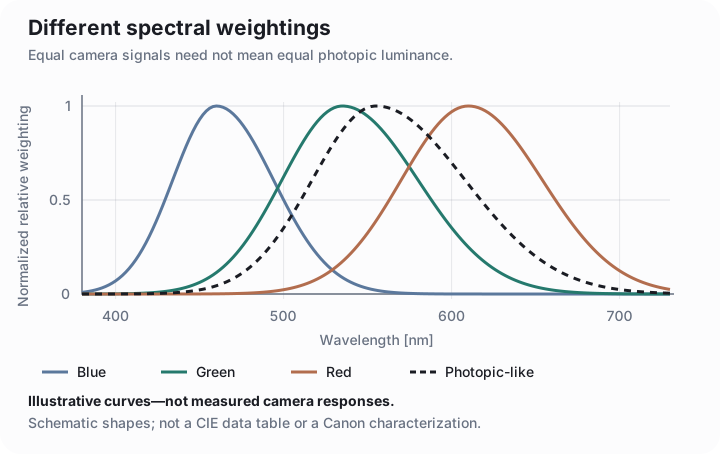
To map luminance pixel by pixel, use a validated RAW workflow with black-level subtraction, linearity checks, flat-field correction, spectral characterization, and reference measurements. RAW samples are not directly cd/m², and a pixel’s bit depth does not establish measurement accuracy. Photometric units also cannot be converted universally into W/m² or photons/m² without spectral information.
Dimensional metrology is a different calibration problem: scale, distortion, perspective, focus-dependent magnification, and mechanical stability. Accurate light measurement alone does not establish accurate lengths.
For close-up measurements, the simple sensor model needs effective aperture and pupil geometry. For changing light, time-resolved measurement or a validated integration procedure is needed.
07 / READ THE SOURCES
Primary references for the definitions, camera behavior, and calibration requirements. Focus-distance references reviewed October 2026; photometry references reviewed September 2026.
Luminance, illuminance, and luminous exposure.
02 · METER CONVENTIONSSekonic calibration guide, p. 89 ↗Reflected K and incident C; flat and hemispherical receptor constants.
03 · DSLR EXAMPLECanon EOS T2i / 550D manual ↗Viewfinder circle, metering modes, Live View, and exposure increments.
04 · MIRRORLESS EXAMPLECanon EOS R5 Mark II manual ↗Metering, crop modes, Safety shift, and AE Microadjustment.
05 · MEASUREMENT PRACTICEBurggraaff et al., 2019 ↗Standardized spectral and radiometric calibration of consumer cameras.
06 · LENS THROUGHPUTEdmund Optics: lens aperture ↗F-number, light throughput, and imaging tradeoffs.
07 · FOCUS PRINCIPLESCanon: autofocus explained ↗Phase and contrast detection; finding focus is distinct from reporting range.
08 · GEOMETRIC OPTICSFeynman Lectures, chapter 27 ↗Thin-lens conjugates and the ideal optical model.
09 · METADATA EXAMPLEExifTool: Canon tags ↗Lens-dependent focus-distance fields and their interpretation.
Camera-specific notes use the manufacturer’s operational manuals. Figures are original explanatory schematics, not measured camera response data. The calculations use the stated models; no physical camera or reference instrument has been calibrated by this page.